Mac · Excel · Google Sheets™

PAE Bird ™

A high-speed polynomial algebra engine for macOS. Expand, factor, solve, differentiate, and generate worksheets — instantly, offline, in bulk.

⬇ Download on the Mac App Store®

Released July 13, 2026 — available now

What PAE Bird does

📐

Polynomial Expansion

Expand any polynomial expression, including multi-variable and nested parentheses.

🔢

Factoring

Full factoring — difference of squares, trinomials, cubes, grouping, and more.

🔍

Solving

Solve symbolic expressions and equations step by step.

Calculus

Differentiate and integrate polynomial expressions using standard rules.

📋

Batch Processing

Input 100+ expressions at once. Process them all in one click.

📄

Worksheet Generator

Generate numbered student and teacher worksheets ready to print or export.

See it in action

Built for real math workflows

One input box. Every algebraic operation. Batch process an entire problem set in seconds.

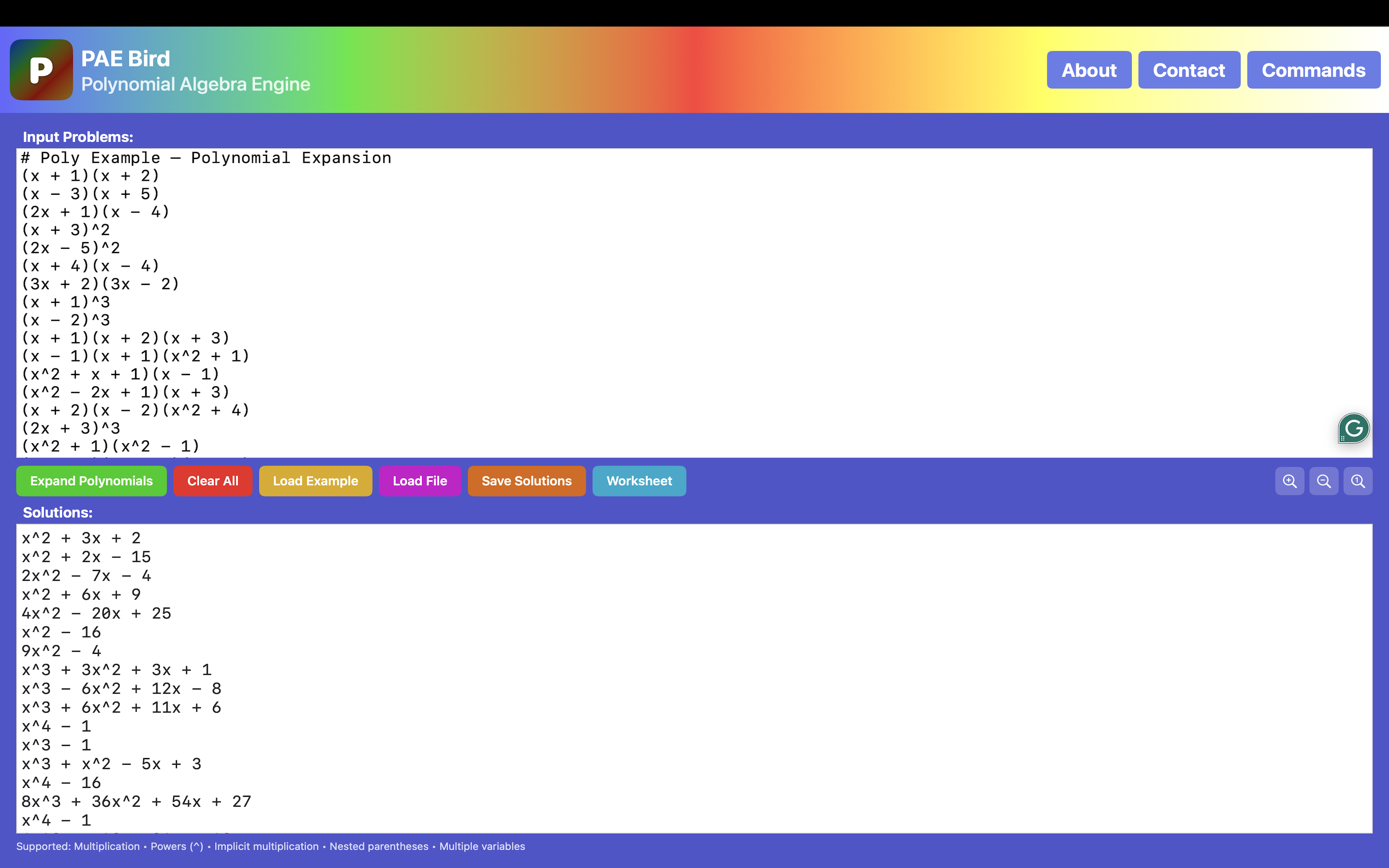
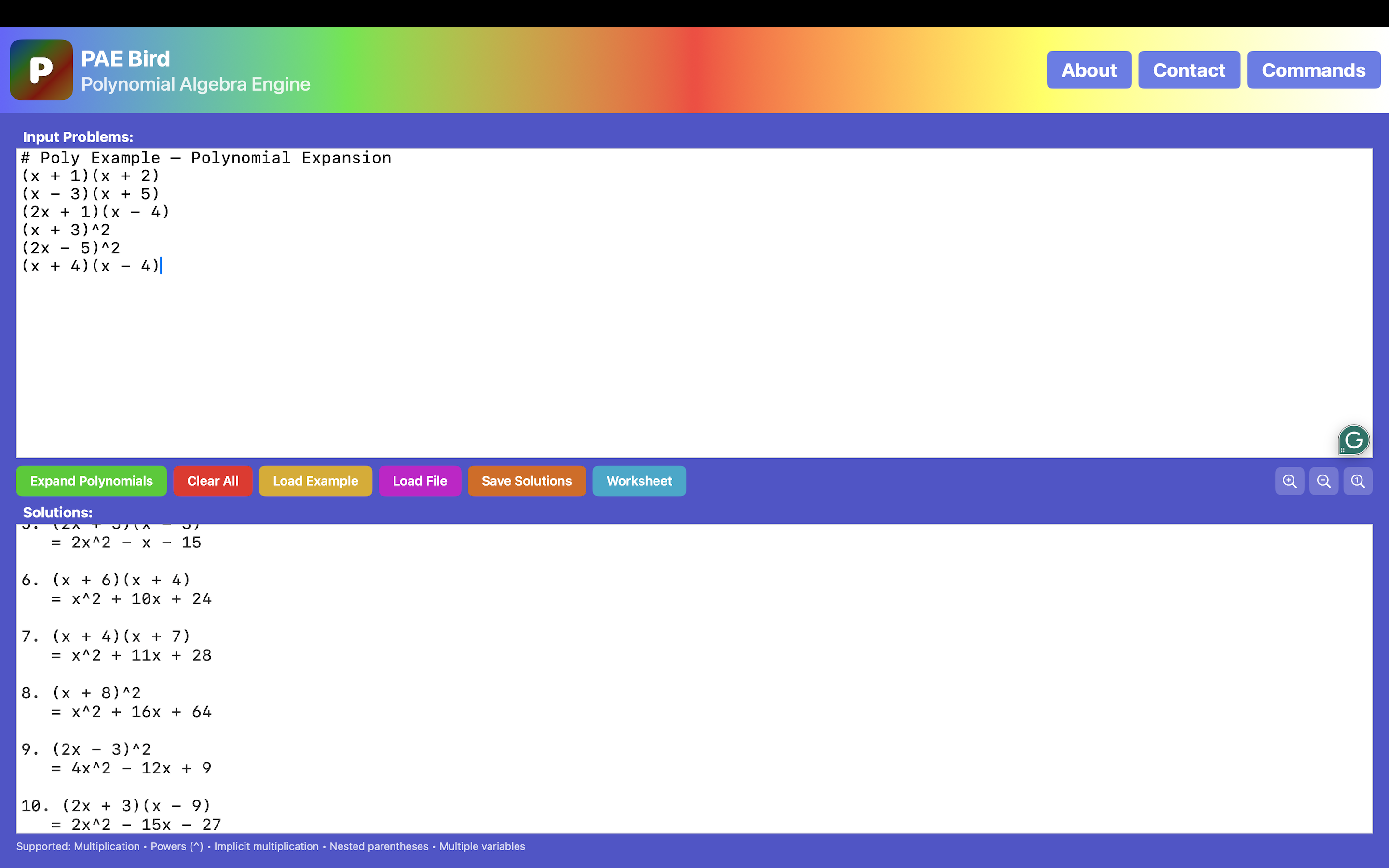
Polynomial expansion — batch input and results

Expand Polynomials

Paste any number of expressions and expand them all at once. Results appear instantly in the Solutions pane.

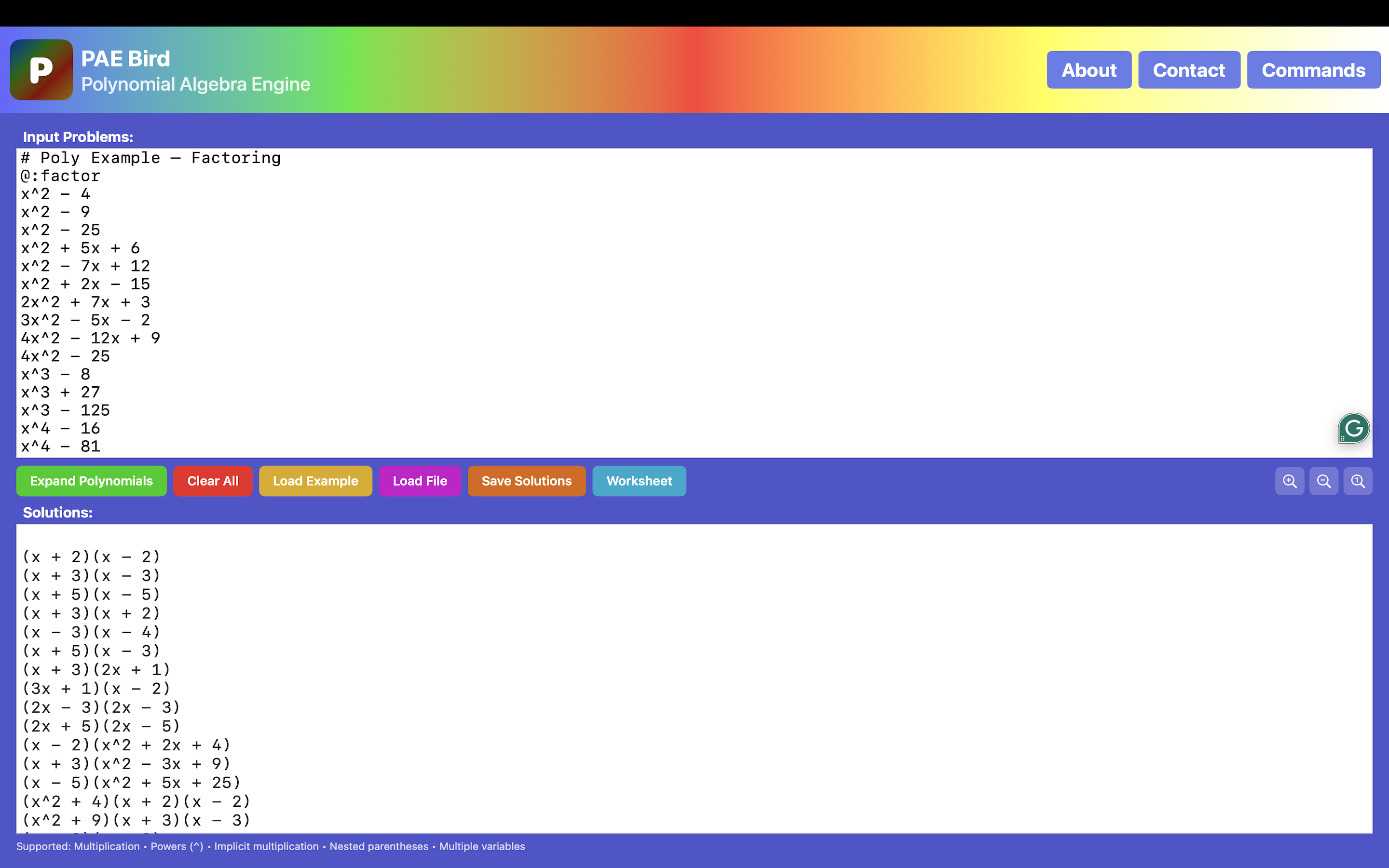
Factoring mode — full factored output

Factor Expressions

Switch to factor mode with a single @:factor directive. Handles difference of squares, trinomials, cubes, and grouping.

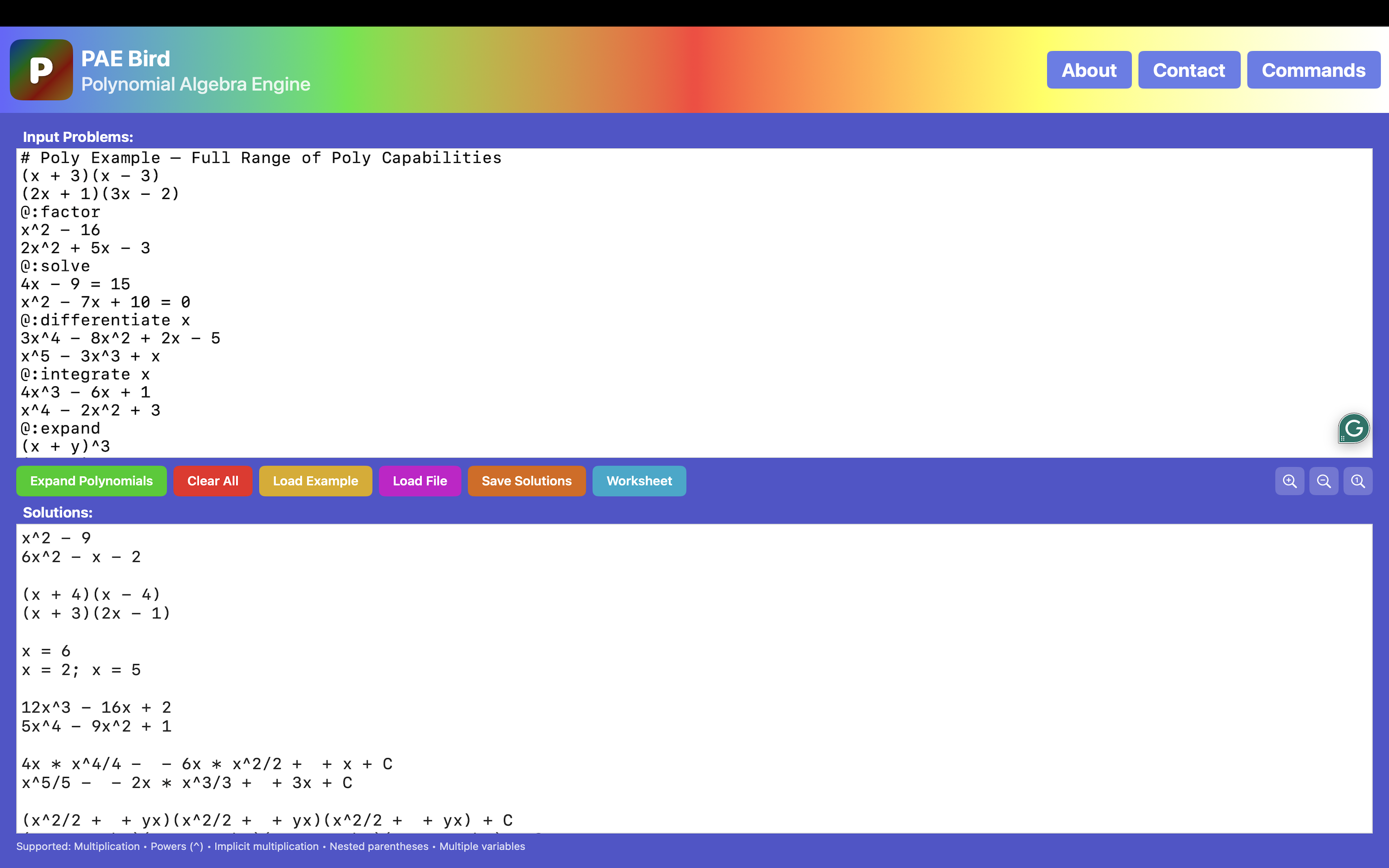
Full range — expand, factor, solve, differentiate, integrate in one batch

Every Operation in One Batch

Mix expand, factor, solve, differentiate, and integrate in a single input using @: mode switches. PAE Bird handles each section correctly.

Worksheet output — numbered problems with solutions

Worksheet Output

Generate formatted worksheets with numbered problems and solutions — ready for students or educators to print and use.

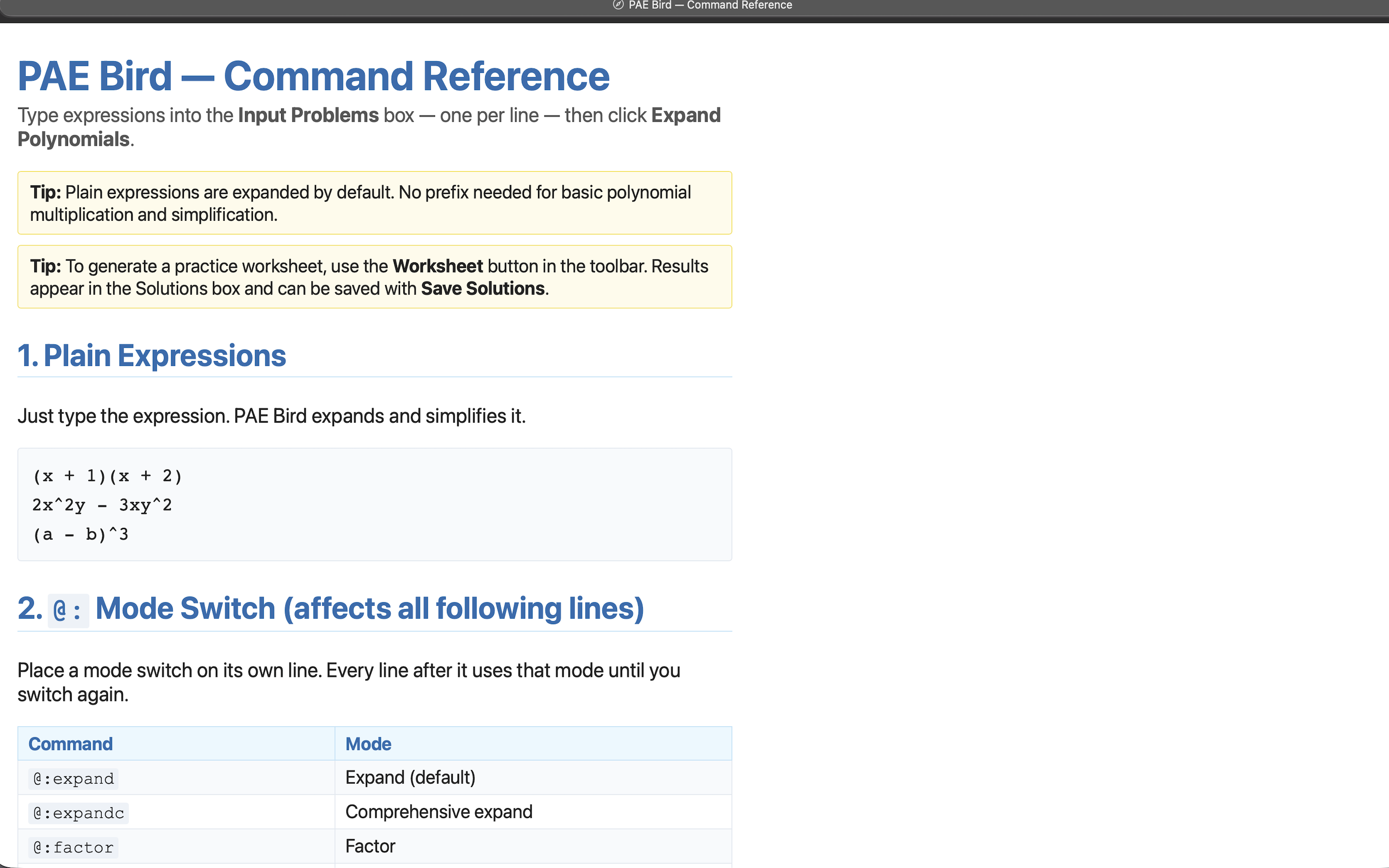
Command reference built into the app

Built-in Command Reference

Every supported operation and @: directive documented inside the app. No external docs needed.

Microsoft Excel®

PAE Bird as Excel Functions

Use PAE Bird's math engine directly inside Excel cells — no app switching, no copy-paste. Solve, expand, factor, differentiate, integrate, and work with matrices as native spreadsheet formulas.

⬇ Download manifest.xml ⬇ Download starter workbook

Sideload the manifest first (see below), then open the starter workbook — 38 functions pre-filled as worked examples.

How to sideload (first-time setup)
  1. Download manifest.xml above.
  2. On Mac: open Finder, press Cmd+Shift+G, and go to:
    ~/Library/Containers/com.microsoft.Excel/Data/Documents/wef
    (create the wef folder if it doesn't already exist), then copy manifest.xml into it.
  3. On Windows, or Excel on the web: in Excel, go to Home → Add-ins → More Settings, choose Upload My Add-in on the Office Add-ins dialog, then browse to and select manifest.xml.
  4. Open (or restart) Excel and open any workbook.
  5. On Mac, go to Home → Add-ins and select PAE Bird from the menu that appears.
  6. The PAE Bird button/task pane appears, and formulas like =PAE.SOLVE(...) work in any cell.

Official Microsoft instructions: Mac · Windows / web

=PAE.SOLVE("x^2 - 5x + 6 = 0") =PAE.EXPAND("(2x-1)^3") =PAE.FACTOR("2x^2 + 6x + 4") =PAE.DIFFERENTIATE("x^3 + 2x","x") =PAE.INTEGRATE("3x^2","x")
PAE Bird Excel add-in — function results

All five PAE functions returning results live in Excel cells.

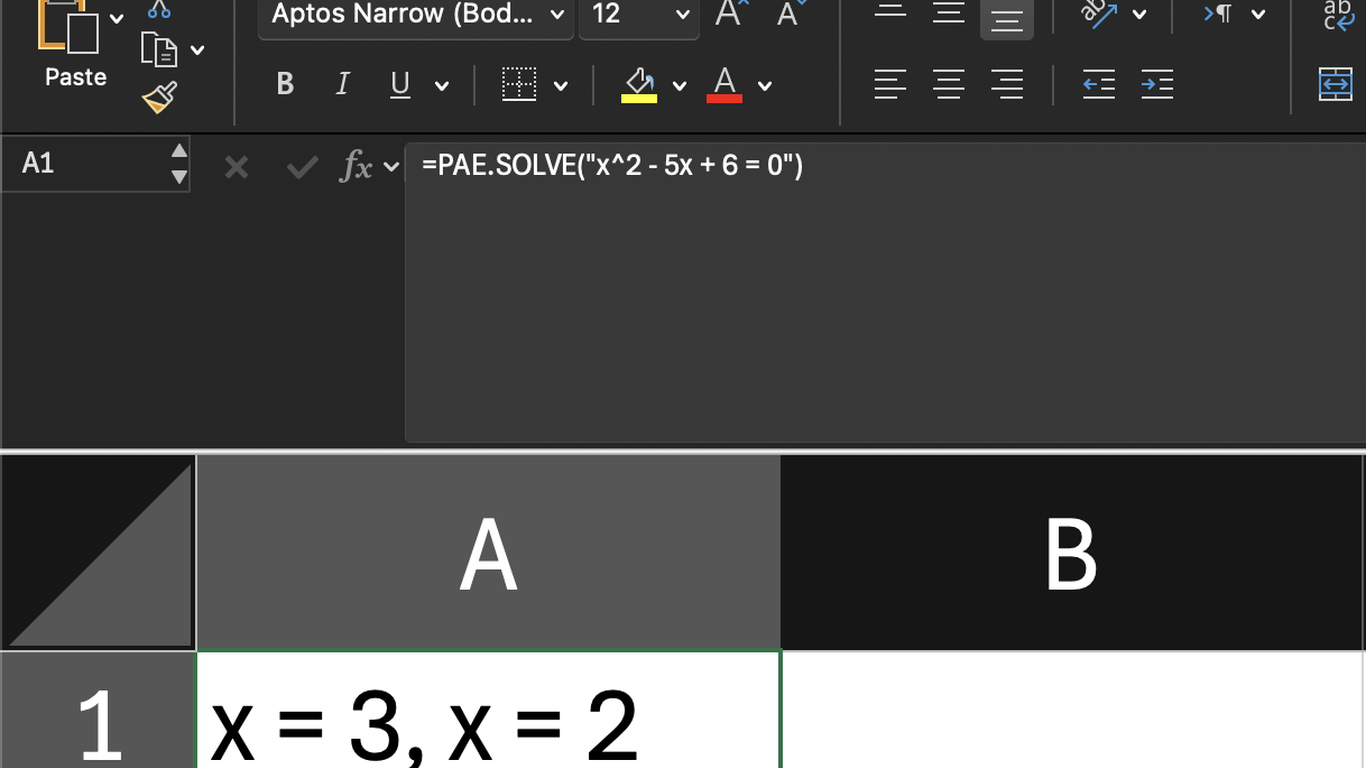
PAE Bird Excel — formula bar showing =PAE.SOLVE()

Native Excel formula syntax — type it just like any other function.

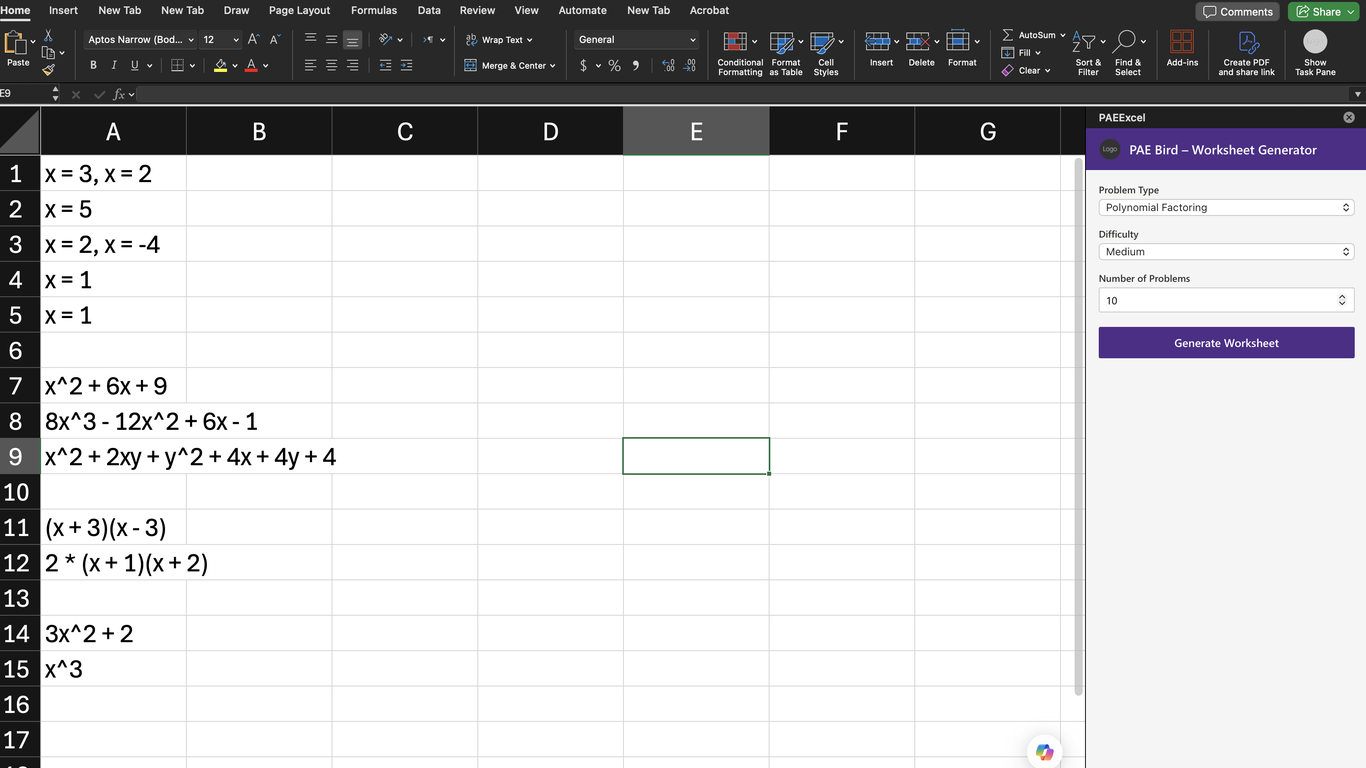
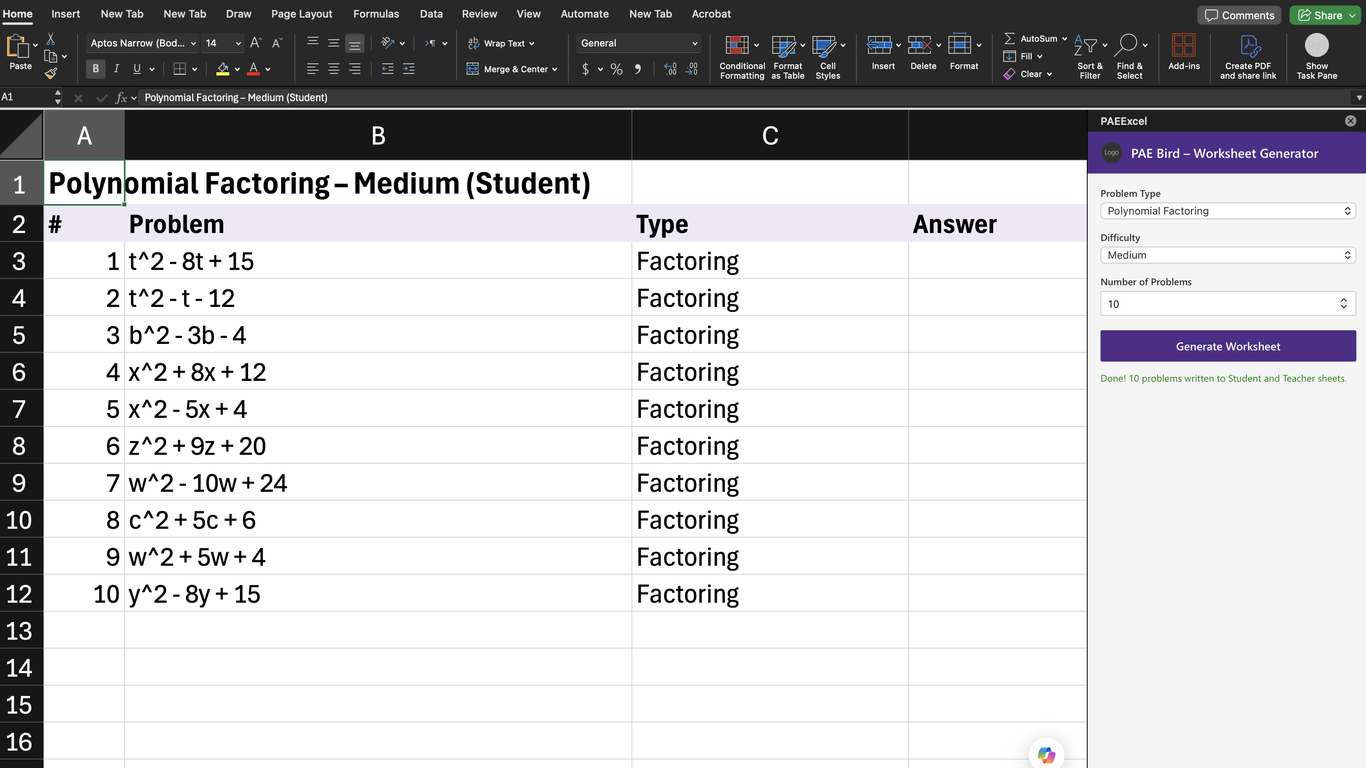
PAE Bird Excel — worksheet generator

Generate Student and Teacher worksheets directly from the task pane.

Google Sheets™

PAE Bird in Google Sheets™

Use PAE Bird's algebra engine as native Google Sheets™ formulas — solve equations, expand, factor, differentiate, and integrate right inside your spreadsheet. Powered by PAE Bird's cloud API; math expressions are processed securely and never stored.

Note: unlike the offline Mac app, the Google Sheets™ add-on sends formula inputs to PAE Bird's API to compute results.

⬇ Coming to the Google Workspace Marketplace soon
=PAE_SOLVE("x^2 - 5x + 6 = 0") =PAE_EXPAND("(2x-1)^3") =PAE_FACTOR("2x^2 + 6x + 4") =PAE_DIFFERENTIATE("x^3 + 2x","x") =PAE_INTEGRATE("3x^2","x")
PAE Bird in Google Sheets — PAE_EXPAND formula bar

Results returned directly into Sheets cells. Formula bar shows the PAE Bird function.

PAE Bird in Google Sheets — PAE_FACTOR formula bar

All five operations available: solve, expand, factor, differentiate, integrate.

PAE Bird Google Sheets — native autocomplete showing all 5 functions

Native Sheets autocomplete surfaces all PAE Bird functions as you type.

LibreOffice

PAE Bird for LibreOffice Calc

38 PAE Bird math functions — solve, expand, factor, calculus, matrices, chemistry, and more — as native LibreOffice Calc formulas. Free tier included.

⬇ Download starter template
=PAE_SOLVE("x^2 - 5x + 6 = 0") =PAE_EXPAND("(2x-1)^3") =PAE_FACTOR("2x^2 + 6x + 4") =PAE_DIFFERENTIATE("x^3 + 2x";"x") =PAE_INTEGRATE("3x^2";"x")

A starter spreadsheet, not an installable extension — open it, click "Enable Macros," and start using the functions or copy them into your own file.

Get PAE Bird

Downloads

Available today on the Mac App Store, Excel, and LibreOffice. Google Sheets™ is coming soon.

🖥️

Mac App

Available now

⬇ Mac App Store®
📊

Excel

Available here for download

⬇ Download manifest.xml ⬇ Download starter workbook

Sideload the manifest, then open the starter workbook — see how. Coming to AppSource soon.

📗

LibreOffice Calc

Available here for download

⬇ Download starter template

A starter spreadsheet, not an extension — open, enable macros, use.

📈

Google Sheets™

Coming to the stores soon

⬇ Not yet available

Coming to the Google Workspace Marketplace soon.

3.1415926535897932384626433832795028841971693993751058209749445923078164062862089986280348253421170679821480865132823066470938446095505822317253594081284811174502841027019385211055596446229489549303819644288109756659334461284756482337867831652712019091456485669234603486104543266482133936072602491412737245870066063155881748815209209628292540917153643678925903600113305305488204665213841469519415116094330572703657595919530921861173819326117931051185480744623799627495673518857527248912279381830119491298336733624406566430860213949463952247371907021798609437027705392171762931767523846748184676694051320005681271452635608277857713427577896091736371787214684409012249534301465495853710507922796892589235420199561121290219608640344181598136297747713099605187072113499999983729780499510597317328160963185950244594553469083026425223082533446850352619311881710100031378387528865875332083814206171776691473035982534904287554687311595628638823537875937519577818577805321712268066130019278766111959092164201989    3.1415926535897932384626433832795028841971693993751058209749445923078164062862089986280348253421170679821480865132823066470938446095505822317253594081284811174502841027019385211055596446229489549303819644288109756659334461284756482337867831652712019091456485669234603486104543266482133936072602491412737245870066063155881748815209209628292540917153643678925903600113305305488204665213841469519415116094330572703657595919530921861173819326117931051185480744623799627495673518857527248912279381830119491298336733624406566430860213949463952247371907021798609437027705392171762931767523846748184676694051320005681271452635608277857713427577896091736371787214684409012249534301465495853710507922796892589235420199561121290219608640344181598136297747713099605187072113499999983729780499510597317328160963185950244594553469083026425223082533446850352619311881710100031378387528865875332083814206171776691473035982534904287554687311595628638823537875937519577818577805321712268066130019278766111959092164201989    3.1415926535897932384626433832795028841971693993751058209749445923078164062862089986280348253421170679821480865132823066470938446095505822317253594081284811174502841027019385211055596446229489549303819644288109756659334461284756482337867831652712019091456485669234603486104543266482133936072602491412737245870066063155881748815209209628292540917153643678925903600113305305488204665213841469519415116094330572703657595919530921861173819326117931051185480744623799627495673518857527248912279381830119491298336733624406566430860213949463952247371907021798609437027705392171762931767523846748184676694051320005681271452635608277857713427577896091736371787214684409012249534301465495853710507922796892589235420199561121290219608640344181598136297747713099605187072113499999983729780499510597317328160963185950244594553469083026425223082533446850352619311881710100031378387528865875332083814206171776691473035982534904287554687311595628638823537875937519577818577805321712268066130019278766111959092164201989    3.1415926535897932384626433832795028841971693993751058209749445923078164062862089986280348253421170679821480865132823066470938446095505822317253594081284811174502841027019385211055596446229489549303819644288109756659334461284756482337867831652712019091456485669234603486104543266482133936072602491412737245870066063155881748815209209628292540917153643678925903600113305305488204665213841469519415116094330572703657595919530921861173819326117931051185480744623799627495673518857527248912279381830119491298336733624406566430860213949463952247371907021798609437027705392171762931767523846748184676694051320005681271452635608277857713427577896091736371787214684409012249534301465495853710507922796892589235420199561121290219608640344181598136297747713099605187072113499999983729780499510597317328160963185950244594553469083026425223082533446850352619311881710100031378387528865875332083814206171776691473035982534904287554687311595628638823537875937519577818577805321712268066130019278766111959092164201989   
Pi illustrated
PAE Bird mascot
PAE Bird want a π?
0 1 1 2 3 5 8 13 21 34 55 89 144 233 377 610 987 1,597 2,584 4,181 6,765 10,946 17,711 28,657 46,368 75,025 121,393 196,418 317,811 514,229 832,040 1,346,269 2,178,309 3,524,578 5,702,887 9,227,465 14,930,352 24,157,817 39,088,169 63,245,986 102,334,155 165,580,141 267,914,296 433,494,437 701,408,733 0 1 1 2 3 5 8 13 21 34 55 89 144 233 377 610 987 1,597 2,584 4,181 6,765 10,946 17,711 28,657 46,368 75,025 121,393 196,418 317,811 514,229 832,040 1,346,269 2,178,309 3,524,578 5,702,887 9,227,465 14,930,352 24,157,817 39,088,169 63,245,986 102,334,155 165,580,141 267,914,296 433,494,437 701,408,733 0 1 1 2 3 5 8 13 21 34 55 89 144 233 377 610 987 1,597 2,584 4,181 6,765 10,946 17,711 28,657 46,368 75,025 121,393 196,418 317,811 514,229 832,040 1,346,269 2,178,309 3,524,578 5,702,887 9,227,465 14,930,352 24,157,817 39,088,169 63,245,986 102,334,155 165,580,141 267,914,296 433,494,437 701,408,733 0 1 1 2 3 5 8 13 21 34 55 89 144 233 377 610 987 1,597 2,584 4,181 6,765 10,946 17,711 28,657 46,368 75,025 121,393 196,418 317,811 514,229 832,040 1,346,269 2,178,309 3,524,578 5,702,887 9,227,465 14,930,352 24,157,817 39,088,169 63,245,986 102,334,155 165,580,141 267,914,296 433,494,437 701,408,733 0 1 1 2 3 5 8 13 21 34 55 89 144 233 377 610 987 1,597 2,584 4,181 6,765 10,946 17,711 28,657 46,368 75,025 121,393 196,418 317,811 514,229 832,040 1,346,269 2,178,309 3,524,578 5,702,887 9,227,465 14,930,352 24,157,817 39,088,169 63,245,986 102,334,155 165,580,141 267,914,296 433,494,437 701,408,733 0 1 1 2 3 5 8 13 21 34 55 89 144 233 377 610 987 1,597 2,584 4,181 6,765 10,946 17,711 28,657 46,368 75,025 121,393 196,418 317,811 514,229 832,040 1,346,269 2,178,309 3,524,578 5,702,887 9,227,465 14,930,352 24,157,817 39,088,169 63,245,986 102,334,155 165,580,141 267,914,296 433,494,437 701,408,733 0 1 1 2 3 5 8 13 21 34 55 89 144 233 377 610 987 1,597 2,584 4,181 6,765 10,946 17,711 28,657 46,368 75,025 121,393 196,418 317,811 514,229 832,040 1,346,269 2,178,309 3,524,578 5,702,887 9,227,465 14,930,352 24,157,817 39,088,169 63,245,986 102,334,155 165,580,141 267,914,296 433,494,437 701,408,733 0 1 1 2 3 5 8 13 21 34 55 89 144 233 377 610 987 1,597 2,584 4,181 6,765 10,946 17,711 28,657 46,368 75,025 121,393 196,418 317,811 514,229 832,040 1,346,269 2,178,309 3,524,578 5,702,887 9,227,465 14,930,352 24,157,817 39,088,169 63,245,986 102,334,155 165,580,141 267,914,296 433,494,437 701,408,733
Audience

Built for

Students Educators Engineers Developers Anyone doing symbolic math at scale

About Stewart Breier

Stewart Breier

Work on PAE Bird began with hand coding, with the first few rounds in LISP, before migrating to C++. Later developments increasingly incorporated AI. The first spark of a dream of a PAE Bird originated during my youthful programming lessons in BASIC, where I was amazed at how I could automate Algebra.

When I am not programming PAE Bird, I am in the classroom as a Substitute Teacher, furthering my education at National University in their MSW program, submitting my poetry, playing TTRPGs, painting digital art, or working on my Tai Chi.

Connect on LinkedIn
Stewart Breier

Get PAE Bird for Mac

Fully offline. Lightweight. Fast. Available on the Mac App Store®.

Download on the Mac App Store®

Released July 13, 2026

This site uses Google Analytics to understand how visitors use the page. No personal data is sold or shared. See our Privacy Policy for details.